Loading brand data...
Lab tested Ultra Armor EMF shielding technology blocks up to 99% of EMF & 5G radiation from devices like cell phones, laptops & tablets.
Monthly traffic, revenue estimates and visitor behavior — based on public data.
DefenderShield (198674-7d.myshopify.com) is a United States-based online store specializing in /Computers. The store is generating approximately $425K in monthly revenue, attracting 48K monthly visitors, with a catalog of 9 products. This brand ranks as a growing store with steady visitor engagement in its category. Their technology stack includes Checkout Blocks, Essential Free Shipping Upsell, and Hulk Form Builder for enhanced store functionality. Geographic distribution shows 77% of traffic from United States, followed by 8% from Canada.
Get precise traffic data
Exact visitor counts, traffic sources, geographic breakdowns & profit margins.
Top 6 products from this store. 9 total in catalog.

Insure your purchase against loss, damage, and theft.

Description Delivering sound via hollow air tubes rather than traditional wires, the DefenderShield® EMF Radiation-Free Earbuds Air Tube Headphones offer an incredible listening experience while protecting from Electromagnetic Field (EMF) radiation exposure. Our DefenderShield® EMF Radiation-Free Earbuds are the best quality air tube earbuds in the world. Our EMF Free Earbuds eliminate RF wireless frequencies due to being wired to your device. Hollow air tubes then switch the electrical signal to an acoustic signal, preventing any ELF (extremely low frequency) radiation from reaching your head and ears. Try out our EMF-Free Over-Ear Headphones if you would rather have over-ear headphones! Perfect For: travel, workouts, listening to music and podcasts, taking short or extended calls Features SAFETY EMF radiation-free technology delivers crystal clear sound via hollow air tubes rather than traditional wires. Braided nylon cord is infused with copper for additional protection from Extremely Low Frequency (ELF) radiation. SOUND Developed by audio engineering specialists. Advanced, professional-grade speakers deliver higher fidelity stereo sound. Air-filled hollow tubes increase space for tone development, producing body and delivering a superior acoustic audio. CONVENIENCE Built-in hands-free microphone with audio controls. Highly flexible yet strong air tubes and tangle-free braided nylon cord. Interchangeable sport tips and clip to keep earbuds securely in place while playing sports, exercising or running. Small, medium and large silicone ear tips for a custom fit. Add-on Memory Foam Earbud Tips to enhance comfort and fit while listening. How to Use The DefenderShield® Radiation-Free Earbuds are built with professional-grade stereo quality speakers, while air tubes increase space for audio development, producing more body and delivering superior acoustic sound. Multiple accessories are included to keep your earbuds secure while doing any activity. Choose from 3 sizes of silicone ear tips, or for a more secure fit try the 3 sizes of silicone sports tips or you can add-on memory foam ear tips that expand once in your ear for a secure fit. Place the DefenderShield® Air Tube Earbuds in your ear, and depending on your earbud model purchased, you can plug the earbuds into the appropriate 3.5 mm or USB-C port on your devices. It is the perfect accessory to go with our superior EMF Radiation Protection Phone , Laptop , and Tablet Cases! Make sure to have the appropriate adapter for cell phones without audio ports. Play the music or audio on the device, and adjust the volume on both the device and on the headphones' audio controller located below the air tubes. Make sure the audio is at a low conversational level (below 65 dB) before placing the EMF-free headphones in your ears. You can use the audio controller on the headphones to raise or lower the volume, play or pause audio, skip a track, and to answer or end phone calls. Experience crystal clear sound with the highs and lows of your music, listen to podcasts without distortion, and enjoy muffle-free conversations with your family friends, all while protecting yourself from EMF radiation. Specifications If you need replacement earbud tips, you can order them here . 3.5 mm: Weight (lbs): 0.056 Cord (in): 42.5 (from 3.5mm plug to speaker) Air Tube Length (in): 7 (from speaker to headset) Earbud Size: Small, Medium, Large Compatible with most 3.5 mm audio devices, and other devices with an adapter (not included) Patent License #: 6453044 USB-C: Weight (lbs): 0.056 Cord (in): 42.5 (from USB-C plug to speaker) Air Tube Length (in): 7 (from speaker to headset) Earbud Size: Small, Medium, Large Compatible with most USB-C audio devices (iPhone 15 and newer, Google Pixel, and newer Samsung phone models) Videos Troubleshooting If your earbuds aren’t working, often the earbuds are not defective but the device, port, or adapter you are using. Even if the port looks correct, it may not be compatible. Follow the guide below to ensure your earbuds are functioning properly. Our Top Tips: Adapters complicate compatibility. Direct connections are the most stable. If devices have multiple port options, the 3.5mm earbuds have the most universal audio and mic connection. For devices with unsupported ports (regular USB, Lightning) it is better to use the 3.5mm earbuds with an adapter, than to use USB-C earbuds with an adapter. The earbuds should work on most devices (with the correct adapter if needed) for audio connections, while the mic and controls may be less universally compatible. 3.5mm Earbuds Information Compatibility Device port AND adapter (if used) needs to be a TRRS (4-pole) connection. Our 3.5mm earbuds include a microphone, which requires a TRRS (4-pole) connection. TRRS (4-pole) → audio + mic + controls TRS (3-pole) → audio only (mic and controls will not work) Always use adapters labeled TRRS, 4-pole, or “supports headset/mic”. Make sure there are 3 lines on the ring of the jack, otherwise, the microphone and controls may not work. Cheap or generic adapters are often just for charging (audio and microphone/controls won’t work) or audio (microphone or controls won’t work). Adapters that may not fully work: Cheap “pass-through” adapters (no DAC) Plane/dual-prong adapters Splitters not rated for TRRS Many Amazon Basics or generic adapters Confirm your device supports TRRS (4-pole) 3.5mm jacks for audio and mic (input and output). Common devices with TRS-only jacks (may not fully work): Desktops and some laptops Older computers with separate headphone + mic jacks Handheld gaming devices Cameras with separate headphones + mic jacks Any device that requires a USB-C or Lightning connection without an active, MFi/USB DAC adapter Check device input/audio settings to select the external headset/mic. Test the earbuds on a different device (or 2) to confirm they function. Refer to your device manual or manufacturer website for “headset with mic” support. How do I fix an unsupported adapter or port? Devices with a TRS-only port cannot be changed to recognize and support mic input. Earbuds should work for audio, but without full mic/controls functionality. You can purchase a 4-pole TRRS 3.5mm adapter, just make sure it says “supports headphone and mic”. Typical Problems & Fixes: Audio works but microphone doesn’t: Likely wrong adapter (TRS instead of TRRS) → use TRRS/4-pole adapter. It must include a DAC if adapting to USB-C or Lightning (cheap pass-through adapters won’t work). Device not selecting external mic → check audio/input settings. App may be blocking external mic → test in a native voice recorder app. Plug not fully seated → push until it clicks, remove case if blocking. Device port is audio-only → check device settings, or test the earbuds on a few different devices. If it works on other devices, the port likely only supports audio. Inline controls (play/volume/skip) don’t work: Some devices ignore analog controls → this is a device limitation — the earbuds themselves are fine. Adapter may not support inline signals → test in a device without an adapter and if it works, get an adapter that supports inline signals. Your device’s media volume may already be at maximum or minimum → check native device volume control. On some devices, the inline volume buttons control media volume, not call volume — try playing music or a video while adjusting. When using with music apps, some devices require the media app to be active first before the earbuds’ inline controls can send commands → Hit Play directly on the device . After the audio starts, the earbuds’ buttons should work as expected. The control buttons may be stuck or jammed → press each button a few times in different spots with varying pressure. Try a longer, firmer press and release. If it still doesn’t work, gently clean around the buttons with a dry brush/cotton swab to remove dust or debris. Static, low volume, or one side cutting out: Straighten kinked air tubes. Clean debris from the port. Clean debris from the ear tip and make sure the ear tip is correctly placed on the earbud. Check Accessibility → Disable Mono Audio to restore normal stereo output. Reset EQ or audio effects. Re-seat the plug firmly and make sure a case isn’t getting in the way. Turn off Bluetooth to ensure audio isn’t being routed wirelessly. Adapter or device issue: Try using it in a different device that doesn’t need an adapter (it may be a faulty adapter connection). Or, try a different device WITH the adapter. If it exhibits the same problem, the adapter is the issue. Ear tips fall off the earbuds: Ear tips are designed to be interchangeable and may not have been put on correctly, or are not fully seated. Remove the ear tip, check for damage, then pinch ear tip and stretch it over the earbud stem as far as it can go, twisting as you place it on. The sport tips feature an in ear hook with an R or L→ Make sure you match the right sport tip (R) with the right earbud (side with mic and controls). Stretch the sport tip on top of the earbud, fully covering the raised silver ring on the earbud attachment. Twist into place so that the ear hook extends directly up. Watch our ear tip replacement video on our website. Ear tips fall out or don’t fit correctly: Due to the high quality metal stereo speakers at the bottom of the air tubes, the earbuds have to hold more weight than a normal pair of earbuds, so they may feel less secure. Try out all sizes of ear tips (S, M, or L) to find the best fit in your ear. Our earbuds have a left and right side. Make sure the right earbud (with mic and controls) is in your right ear. Pull the top of your ear up and gently twist until the ear bud is firmly and comfortably seated in your ear. The slanted ear tip should be angled 35 ° forward towards the front of your face. The ergonomic sport tips come with an in-ear hook for an extra secure fit. Using the 2 plastic metal-sprung clips, clip each wire just below the air tubes to your collar or shirt to support the weight of the earbuds and reduce movement. Our earbuds are compatible with most third-party earbud tips and ear hooks, allowing you to purchase a custom option to provide the most comfortable and secure fit for you. USB-C Earbuds Information Make sure your device port supports analog USB-C audio (adapter not recommended). There are different types of USB‑C headphones/adapters: Active : Has its own internal DAC (digital to analog converter) + amp. It expects digital audio from the device. Passive / “Accessory Mode” : Relies on the device to output analog audio through USB‑C just like a 3.5 mm jack would. Our USB-C Air Tube earbuds use analog audio signaling with a microphone , meaning it works with devices that support analog audio input . That means the device has a DAC to convert the audio from analog to digital. Every device manufacturer handles analog USB‑C differently — some support it fully, some partially (audio yes, mic no), and some not at all. Apple does not explicitly state analog USB-C earbud compatibility with its newer USB-C iPhones, but our own testing has shown consistent functionality with the DefenderShield USB-C earbuds. Key Note: Analog USB‑C headphones work best directly plugged into a device that supports analog USB‑C audio. Mic and inline controls may not function on partially compatible devices, or when using an adapter. How to check compatibility: Confirm your device supports analog USB-C audio/microphone. Likely compatible devices: Samsung Galaxy S20 and newer Newer iPad Pro / iPad Air with analog USB‑C audio Some Chromebooks or Windows laptops that support analog USB‑C audio iPhone 15 and newer (*doesn’t explicitly state analog USB-C support) Likely incompatible or partial function: Android phones with a 3.5mm and USB-C port (Moto G Stylus 5G) don’t support any USB-C audio Samsung Galaxy Z Fold Motorola Razr OnePlus Nord series Most Windows laptops without analog USB‑C audio Nintendo Switch (audio may work; mic may not) USB-C hubs, multi-port adapters, charging-only adapters, or extenders Test on another known compatible device to confirm functionality. Refer to your device manual or manufacturer website for “USB-C analog audio” or “headset with mic” support. Adapters / Hubs: Plug directly into the device for the best results. Avoid multi-port USB-C hubs, charging-only adapters, docking stations, car USB ports, or USB-C extenders. Lightning to USB-C requires an adapter that is labeled "Charging and Audio" or "Data Transfer" to support full functionality. How do I fix an unsupported adapter or port? If the device has an audio and mic compatible port (3.5mm, Apple Lightning), purchase an adapter that converts to USB-C analog audio with microphone . Depending on the adapter, there may still be issues with mic and inline controls. Devices that do not support analog USB-C with mic input cannot be changed to recognize the earbuds, and there is not an adapter that will convert USB-C analog audio earbuds to digital. Earbuds may be audio-only. Typical Problems & Fixes Audio works but microphone doesn’t: Device may not support analog USB-C mic → check audio/input settings. Android: Settings → Sound → Input → select “Headset Microphone” App may be blocking external mic → test in a native voice recorder app. Plug not fully seated → push until it clicks, remove case if blocking. Test on a different compatible device → if it works elsewhere, your device likely does not support analog USB-C mic input. Inline controls (play/volume/skip) don’t work: Many devices only support digital USB-C commands, so analog controls may not function → this is a device limitation — the earbuds themselves are fine. Adapter may not support inline signals → test in a device without an adapter and if it works, get an adapter that supports inline signals if possible or try to use without an adapter. Your device’s media volume may already be at maximum or minimum → check native device volume control. On some devices, the inline volume buttons control media volume, not call volume — try playing music or a video while adjusting. When using with music apps, some devices require the media app to be active first before the earbuds’ inline controls can send commands → Hit Play directly on the device . After the audio starts, the earbuds’ buttons should work as expected. The control buttons may be stuck or jammed → press each button a few times in different spots with varying pressure. Try a longer, firmer press and release. If it still doesn’t work, gently clean around the buttons with a dry brush/cotton swab to remove dust or debris. Static, low volume, or one side cutting out: Straighten kinked air tubes. Clean debris from the port. Clean debris from the ear tip and make sure the ear tip is correctly placed on the earbud. Check Accessibility → Disable Mono Audio to restore normal stereo output. Reset EQ or audio effects. Re-seat the plug firmly and make sure a case isn’t getting in the way. Turn off Bluetooth to ensure audio isn’t being routed wirelessly. Adapter or device issue: Try using it in a different device that doesn’t need an adapter (it may be a faulty adapter connection). Or, try a different device WITH the adapter. If it exhibits the same problem, the adapter is the issue. Ear tips fall off the earbuds: Ear tips are designed to be interchangeable and may not have been put on correctly, or are not fully seated. Remove the ear tip, check for damage, then pinch ear tip and stretch it over the earbud stem as far as it can go, twisting as you place it on. The sport tips feature an in ear hook with an R or L→ Make sure you match the right sport tip (R) with the right earbud (side with mic and controls). Stretch the sport tip on top of the earbud, fully covering the raised silver ring on the earbud attachment. Twist into place so that the ear hook extends directly up. Watch our ear tip replacement video on our website. Ear tips fall out or don’t fit correctly: Due to the high quality metal stereo speakers at the bottom of the air tubes, the earbuds have to hold more weight than a normal pair of earbuds, so they may feel less secure. Try out all sizes of ear tips (S, M, or L) to find the best fit in your ear. Our earbuds have a left and right side. Make sure the right earbud (with mic and controls) is in your right ear. Pull the top of your ear up and gently twist until the ear bud is firmly and comfortably seated in your ear. The slanted ear tip should be angled 35 ° forward towards the front of your face. The ergonomic sport tips come with an in-ear hook for an extra secure fit. Using the 2 plastic metal-sprung clips, clip each wire just below the air tubes to your collar or shirt to support the weight of the earbuds and reduce movement. Our earbuds are compatible with most third-party earbud tips and ear hooks, allowing you to purchase a custom option to provide the most comfortable and secure fit for you.


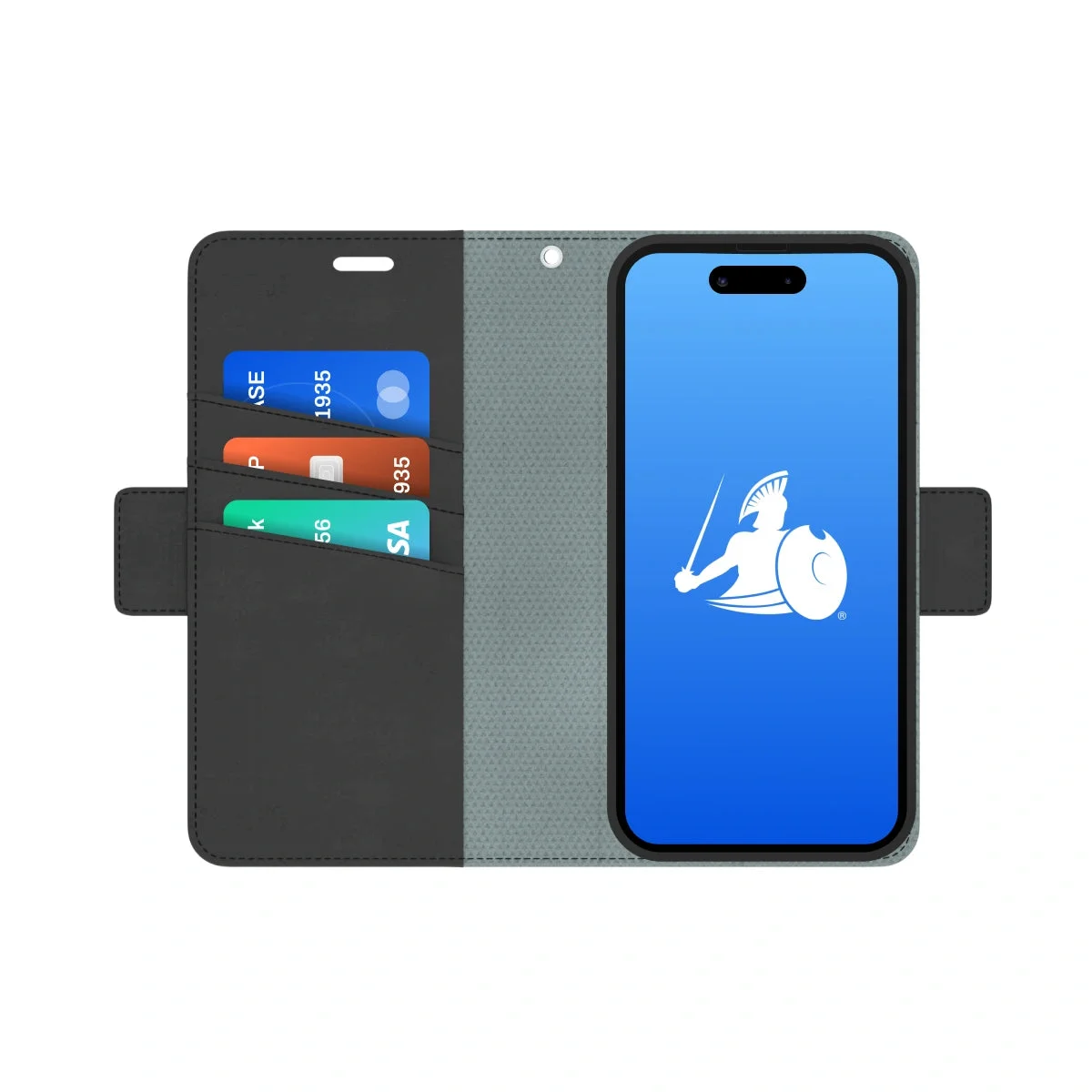
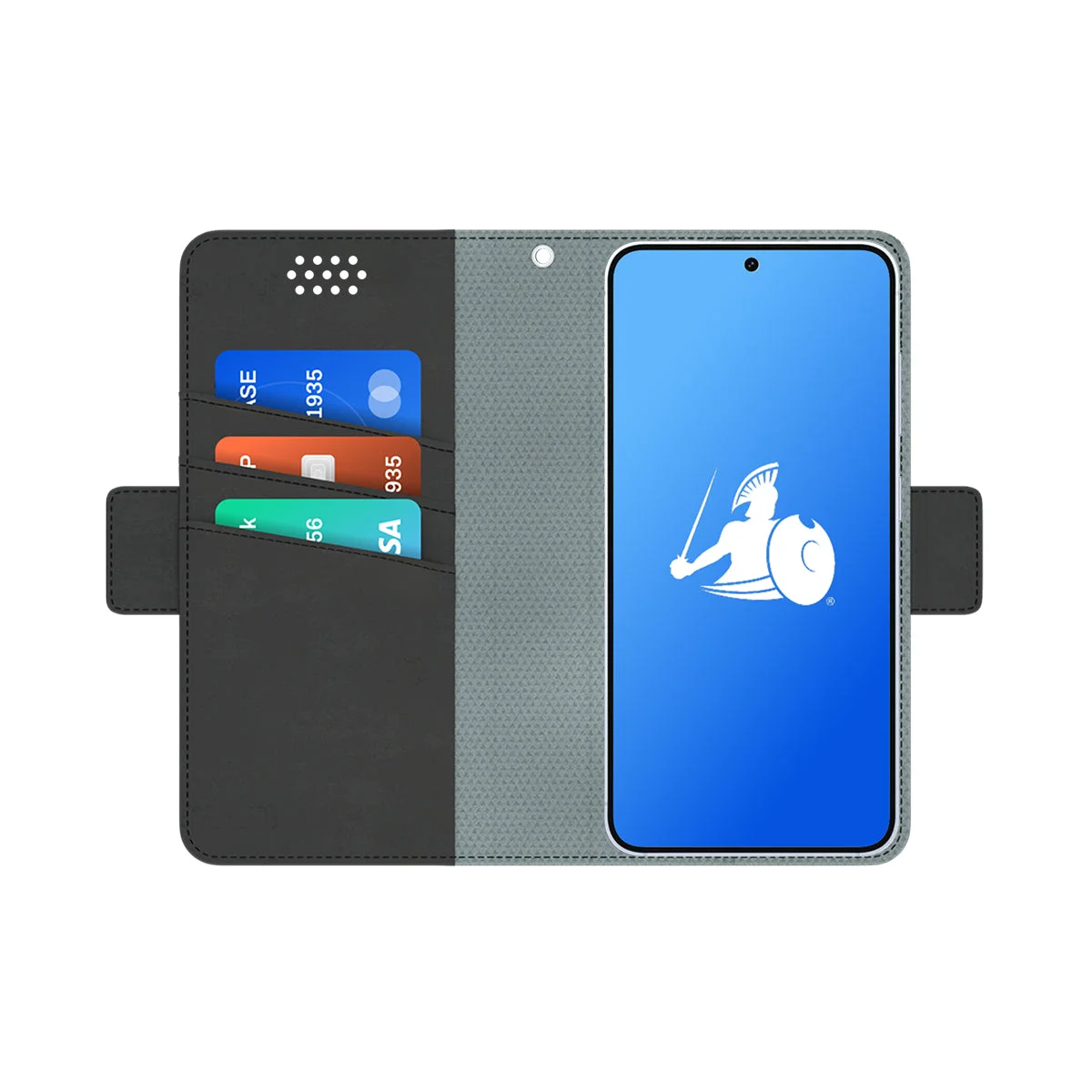
Description This EMF blocking wallet case for the iPhone 16 harnesses our Ultra Armor+® Shielding Technology in the front cover to block EMF radiation and the entire 5th Generation spectrum. Keep shielded front cover in between your body and your phone to reduce direct contact with both radio frequency (RF) signals and battery (ELF) emissions. Durable design with scratch-resistant vegan leather exterior and anti-shock interior protects your iPhone 16 series in style. Two versatile options let you choose the Magnetic Wallet Case with 3 RFID-blocking slots and wrist strap or the compact SlimFlip for easier storage. Enjoy full camera functionality thanks to the perfectly fitted camera cut-out. Perfect for daily use with iPhone 16 series , carrying essentials on-the-go, traveling, and as a wallet or clutch replacement. Order today and enjoy a 1-year warranty! Comprehensive EMF Radiation Protection and RFID Blocking for Your iPhone 16 Stay protected from potentially harmful effects of EMF radiation with the DefenderShield iPhone 16 Series Case. Using Ultra Armor+ ® Shielding Technology , this case blocks up to 99% of EMF radiation across all frequencies, including the entire 5Gen spectrum (0-90 GHz). Our advanced shielding creates a safe barrier between you and your phone, without affecting cellular service or connectivity. With our EMF blocking iPhone case, boost your confidence in using your phone safely without compromising your health! Designed To Match Your Style and Protect You From Phone EMF Radiation Built for durability, this case combines a vegan leather exterior with a textured microfiber interior . These premium materials resist scratches, stains, and drops, keeping your device safe and stylish. The anti-shock rubber nesting absorbs impact for added protection in case of drops. Plus, the secure magnetic tab closure keeps your phone and essentials safely enclosed while allowing easy access when you need it. Get maximum versatility with a detachable magnetic wallet that offers three RFID-blocking slots for cards and IDs. It also includes a clip-on wrist strap, providing flexible carrying options for life on the go. Enjoy full camera functionality and a foldable stand for landscape viewing, adding convenience to your daily phone use Order today to stay safe against modern threats! Features About Ultra Armor® EMF Shielding Technology Our custom-created Ultra Armor® Shielding Technology can block up to 99% of wireless radio frequency (RF) radiation up to 90 GHz, including all bands of the 5th Generation spectrum: low-band operating below 1 GHz, mid-band or c-band up to 6 GHz, and high-band millimeter waves at 24 GHz and higher. It also blocks WiFi, Bluetooth, Cellular (1G-5Gen), RFID, NFC, GPS, and other microwaves and radio waves. Ultra Armor+® gives additional shielding for Extremely Low Frequency (ELF) radiation emitting from the battery of the phone. How to Use The DefenderShield® iPhone 16 Series Cases are the only cell phone anti-radiation shield capable of shielding all forms of cell phone radiation, including ELF battery emissions and the entire 5th generation network. When using your cell phone, just keep the shielded front cover between your body and radiation-emitting cell phone. By keeping the shielded front cover closed against any part of your body, a barrier is created to help protect from a broad spectrum of potentially harmful cell phone radiation emissions. Pair the iPhone 16 Magnetic Wallet Case with our DefenderShield Magnetic Car Phone Mount to safely enhance your driving experience. The design folds to function as a stand for landscape viewing and a secure magnetic closure ensures safe-keeping of your valuables and protection for your phone. Specifications Case Outer dimensions (in) Weight (oz) Wallet case for iPhone 16 6 x 3.25 x .85 6.6 Wallet case for iPhone 16 Plus 6.6 x 3.35 x .85 6.4 Wallet case for iPhone 16 Pro 6 x 3.25 x .8 5.6 Wallet case for iPhone 16 Pro Max 6.6 x 3.30 x .85 6.4 Video

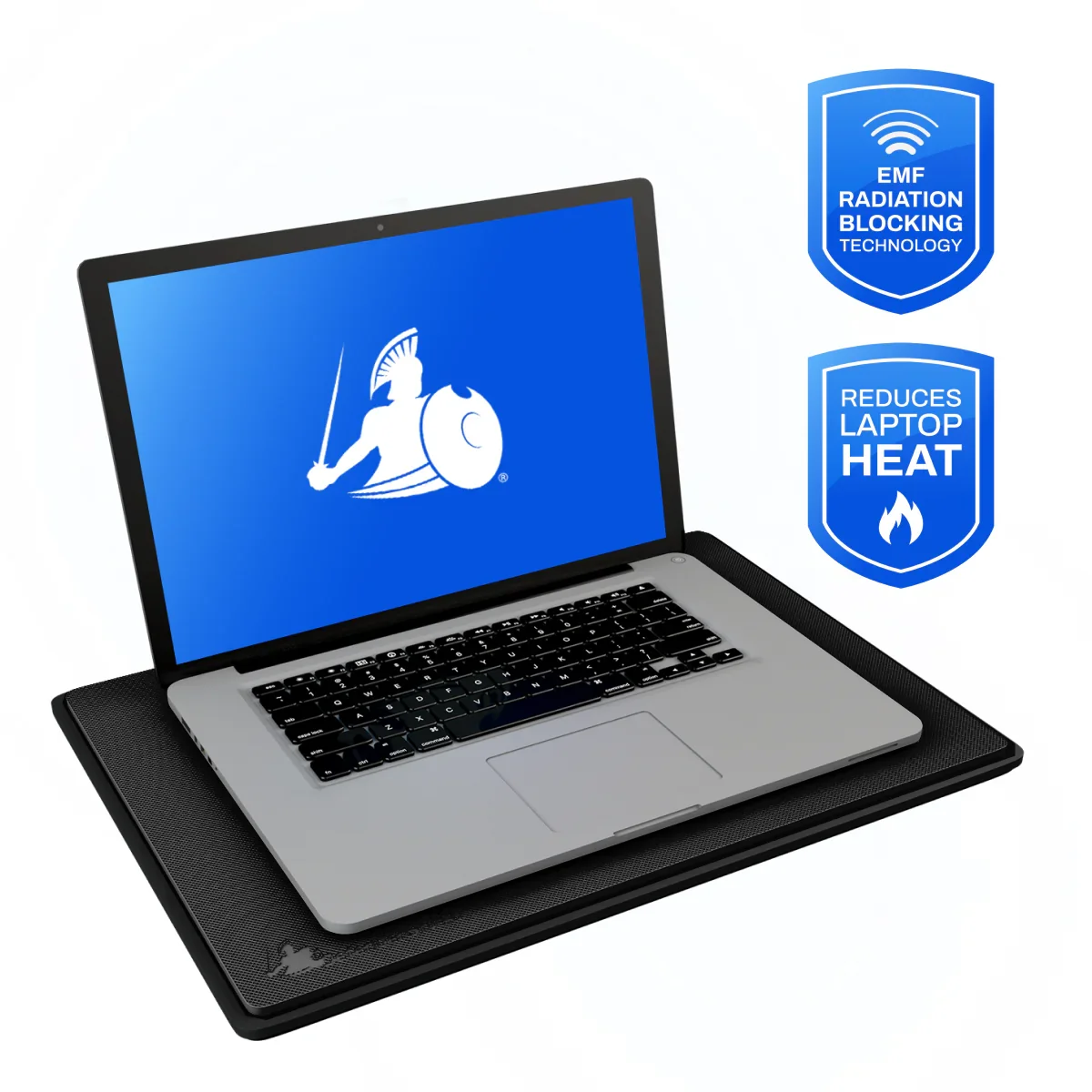
Key Features The DefenderPad Laptop EMF Radiation & Heat Shield provides powerful protection against harmful EMF emissions and unwanted heat, creating a safe and comfortable barrier between your device and your lapbody. Key features include: Blocks the full spectrum of EMF from your body. Using DefenderShield’s proprietary Ultra Armor+ shielding technology, this laptop pad blocks both wireless signals (RF) like WiFi, along with battery emissions (ELF) from radiating downward into your lap. Reduces heat exposure to the body. The Standard DefenderPad also prevents laptop-generated heat from reaching your lap, while the DefenderPad Lite reduces heat exposure. This dual protection helps reduce discomfort and supports the protection of sensitive areas, including the reproductive organs. Ergonomic, slim, and portable design. Lightweight and travel-ready, the slim portfolio of the pad easily fits in a bag or backpack. Compatible with all laptops up to 17″ . The DefenderPad supports laptops, tablets, gaming devices, and more. This eliminates the need to buy different shields for different devices. Non-slip surface for stability. The top surface of the standard DefenderPad is designed with a silicone heat-resistant non-slip surface to keep your laptop securely in place, ensuring stability while working, studying, or gaming. The DefenderPad Lite uses textured non-slip vegan leather. Simple, low-maintenance care. Easy to clean with a damp cloth or paper towel, the DefenderPad stays functional and professional-looking even with daily use. Protect yourself and your loved ones with the DefenderPad Laptop Radiation Shield: the trusted solution for blocking EMF radiation and heat from laptops and other devices. Add it to your cart today for safer, more comfortable device use. Description The DefenderShield Laptop EMF Radiation & Heat Shield is the world’s leading laptop radiation protection pad, designed to block potentially harmful electromagnetic fields (EMFs) and reduce heat exposure to your lap during laptop use. Laptops emit multiple forms of wireless radiation, including Wi-Fi and, Bluetooth, as well as cellular signals for newer, broadband-enabled laptops. Additionally, the battery and power being used by your laptop leaks energy, called ELF (Extremely Low Frequency), that can increase radiation and concentrated heat exposure to sensitive areas of the body. For online workers, students, gamers , and anyone who spends long hours on laptops, this daily exposure adds up. The DefenderPad addresses this problem by using Ultra Armor+ shielding technology , proven to block up to 99% of EMF emissions across the widest range of frequencies from 0–90 GHz. At the same time, an integrated silicone thermal barrier in the Standard DefenderPad prevents direct heat transfer, ensuring comfort and reducing risks associated with extended device usage. Engineered for convenience , the DefenderPad is lightweight, slim, and easy to carry. Its non-slip surface keeps laptops stable, while its universal size works with all handheld devices up to 17". The DefenderPad Lite is suitable for devices 15” and smaller. Unlike bulky alternatives, it blends seamlessly into your daily routine without interfering with laptop performance. This design balances protection and usability , powerful shielding where you need it, without limiting connectivity or device function. Please note: The DefenderPad shields EMF and heat directed downward toward your lap but does not block emissions that radiate outward into the room. For comprehensive protection, the DefenderPad can be paired with other DefenderShield products. Many customers use it alongside our EMF Radiation Blocking Blanket , EMF Protection Shorts , or Blue Light Blocking Glasses to reduce the potentially harmful effects of laptop use. How it Works The DefenderPad uses our custom-developed Ultra Armor+ shielding technology to conduct, absorb, and dissipate electromagnetic fields on top of the DefenderPad from reaching the bottom of the DefenderPad, close to your body and lap. EMF shielding: Our state-of-the art, military grade Ultra Armor+ technology placed within the DefenderPad blocks RF and ELF radiation across the spectrum, from low-frequency battery emissions to high-frequency 5G. Thermal protection: The silicone top of the standard DefenderPad blocks laptop heat from transferring to your lap, helping reduce discomfort and potential thermal risks. The DefenderPad Lite can reduce heat, but may not completely block it, especially when using high power devices. Shielding performance: Blocks up to 99% of EMF radiation Frequency Range: 0–90 GHz Protection against: 5G (all bands) 4G / LTE / 3G / 2G Wi-Fi (2.4 & 5 GHz) Bluetooth GPS RFID & NFC ELF (battery/power emissions) Testing Method: Ultra Armor+ Shielding technology is independently tested by FCC-accredited laboratories for shielding effectiveness. How to Use Using the DefenderPad is simple, making it easy to integrate in your daily habits: Place the DefenderPad on your lap, desk, or any surface where you plan to use your laptop. Even when your laptop is not directly on your lap, you are still exposed to some radiation. Set your laptop or tablet on top of the non-slip surface. Work, study, or play as usual, all while the DefenderPad passively blocks EMF and heat going in the downward direction. Care Instructions: Wipe clean with a damp cloth or paper towel. Do not machine wash or immerse in water. Store flat to maintain performance and shape. Specifications The DefenderPad comes in two models to fit different laptop sizes: DefenderPad Laptop EMF Radiation & Heat Shield – Standard Compatible with laptops up to 17″ Dimensions: 15.8″ x 11″ x 0.25″ Weight: 2.2 lbs DefenderPad Laptop EMF Radiation & Heat Shield – Lite Compatible with laptops up to 15″ Dimensions: 14″ x 9.5″ x 0.25″ Weight: .65 lbs Material Composition: Standard exterior: food-grade polyurethane plastic outer, thermal resistant textured silicone top Lite exterior: polyurethane textured vegan leather Shielding layer: Multi-layer shielding fabric (proprietary Ultra Armor+ technology) Video Watch how the DefenderPad blocks EMF radiation and heat from your laptop while keeping you comfortable and protected.

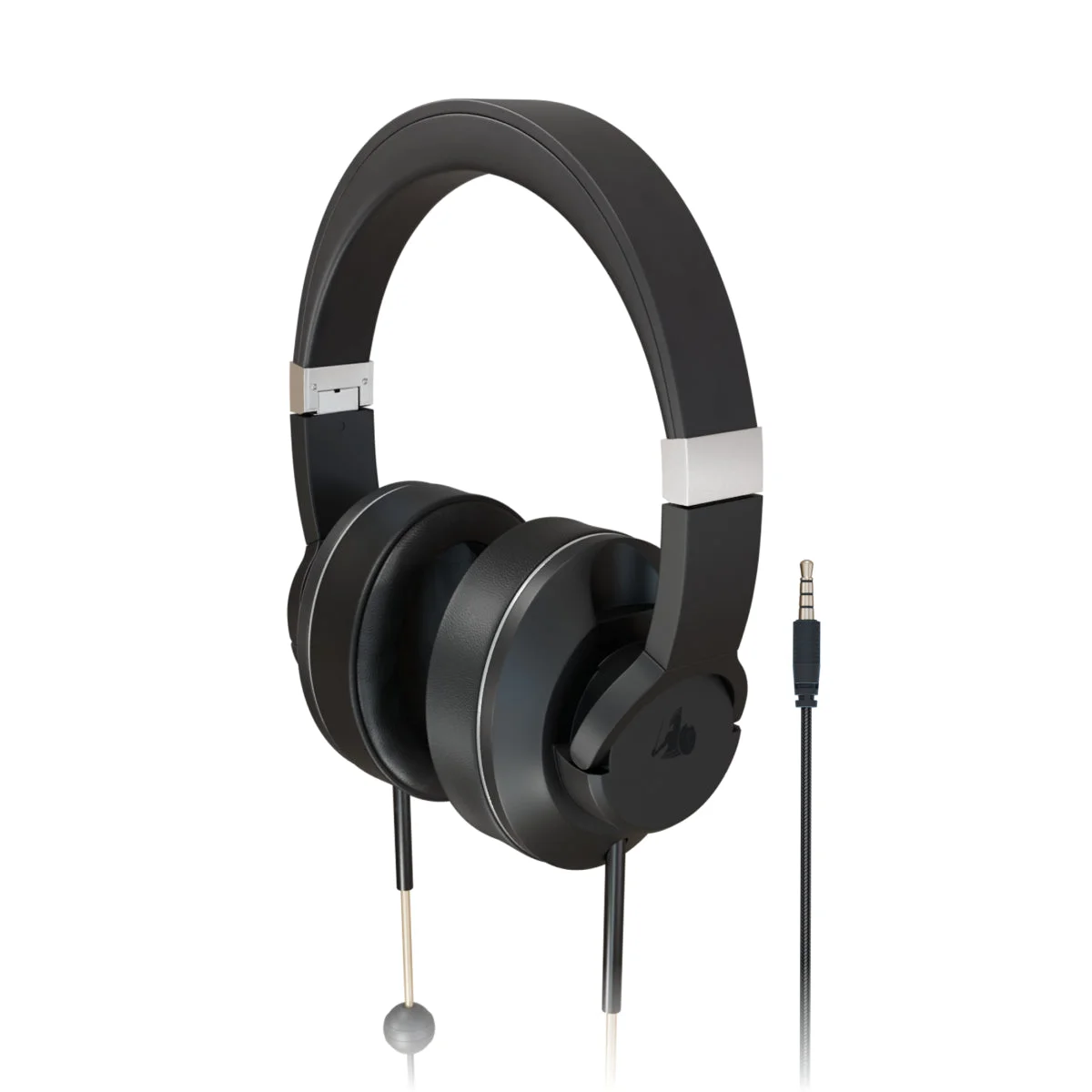
Description Delivering sound via hollow air tubes rather than traditional wires, the DefenderShield® EMF Radiation-Free Air Tube Headphones offer an incredible listening experience while protecting from Electromagnetic Field (EMF) radiation exposure. The DefenderShield® EMF Radiation-Free Stereo Headphones are built with professional-grade stereo quality speakers, while air tubes increase space for audio development, producing more body and delivering superior acoustic sound. For other Air Tube Headphone options, take a look at our EMF-Free Air Tube Earbuds ! Features SAFETY EMF radiation-free technology delivers crystal clear sound via hollow air tubes rather than traditional wires. Braided nylon cord is infused with copper for additional protection from Extremely Low Frequency (ELF) radiation. Aluminum speakers eliminate RF frequencies. SOUND Developed by audio engineering specialists. Advanced, professional-grade speakers deliver higher fidelity sound. Air-filled hollow tubes increase space for tone development, producing body and delivering a superior acoustic audio. CONVENIENCE Foldable for easy storage inside the protective zipper case. Adjustable headpiece for a custom fit. Built-in hands-free microphone with audio controls. Highly flexible yet strong air tubes and tangle-free braided nylon cord. How to Use Place the DefenderShield EMF Free Headphones on your head with the "R" and "L" on the inside of the adjustable headpiece over the correct ears. Plug the EMF Free Headphones into the appropriate 3.5 mm or USB-C port on your devices. Make sure to have the appropriate adapter for cell phones without audio ports. Play music or audio on the device, and adjust the volume on both the device and on the headphones' audio controller located below the air tubes. Make sure the audio is at a low conversational level (below 65 dB) before placing the headphones on your ears. You can use the audio controller on the headphones to raise or lower the volume, play or pause audio, skip a track, and to answer or end phone calls. Experience crystal clear sound with the highs and lows of your music, listen to podcasts without distortion, and enjoy muffle-free conversations with your family friends, all while protecting yourself from EMF radiation. When not in use, you can place the DefenderShield Air Tube Headphones in the protective zippered carrying case. Follow the instructions below to avoid bending or kinking the air-tubing, as bent air tubes may prevent sound from reaching the headset. PLEASE NOTE: iPhone 7 models and newer require a lightning cord adapter for compatibility with the DefenderShield Headphones. Specifications Weight (lbs): 0.81 Dimensions (in): 8 x 7.25 x 3.5 Cord (in): 42.5 (from 3.5mm plug to speaker) Air Tube Length (in): 5 (from speaker to headset) Compatible with most 3.5mm audio devices Weight (lbs): 0.81 Dimensions (in): 8 x 7.25 x 3.5 Cord (in): 42.5 (from USB-C plug to speaker) Air Tube Length (in): 5 (from speaker to headset) Compatible with most USB-C audio devices Patent License #: 6453044 Video

Description This universal smartphone wallet case for phones features Ultra Armor+® Shielding Technology, providing comprehensive protection against EMF radiation and the entire 5th Generation spectrum (0-90GHz). Keep shielded front cover in between your body and your phone to reduce direct contact with both radio frequency (RF) signals and battery (ELF) emissions. Enjoy universal compatibility thanks to two sizes and a magnetic plate that adheres to your phone so it can be detached and re-magnetized to the wallet cover with ease. Keep your essentials secure with 3 RFID pockets for credit cards and IDs, plus an optional wristlet strap. Perfect for everyday use with most smart phone models (see compatibility list), carrying essentials on-the-go, wallet/clutch replacement. Order today and enjoy a 1-year warranty! Comprehensive EMF Radiation Protection and RFID Blocking for Your Phone Stay protected from potentially harmful effects of EMF radiation with the DefenderShield Universal Phone Wallet Case. Using Ultra Armor+ ® Shielding Technology , this case blocks up to 99% of EMF radiation across all frequencies, including the entire 5Gen spectrum (0-90 GHz). Our advanced shielding creates a safe barrier between you and your phone, without affecting cellular service or connectivity. With our EMF blocking phone case, boost your confidence in using your phone safely without compromising your health! Check out our full lineup of EMF Blocking iPhone Wallet Cases here ! Designed To Match Your Style and Protect You From Phone EMF Radiation Built for durability, this wallet case combines a vegan leather exterior with a textured microfiber interior . These premium materials resist scratches, stains, and drops, keeping your device safe and stylish. Since this is a universal case, we don't offer a specific phone nesting. Instead, we offer a detachable metal adhesive plate that adheres to your current phone nesting of your choice, and then magnetizes to the inside back cover of the DefenderShield Universal Phone Case. For replacement adhesive plates, you can order them here . The secure magnetic tab closure keeps your phone and essentials safely enclosed while allowing easy access when you need it. Plus, it offers three RFID-blocking slots for cards and IDs. It also includes a clip-on wrist strap, providing flexible carrying options for life on the go. Enjoy a foldable stand for landscape viewing, adding convenience to your daily phone use. Order today to stay safe against modern threats! Features The DefenderShield® Radiation Protection Universal Phone Case Shields: About Ultra Armor® EMF Shielding Technology Our custom-created Ultra Armor® Shielding Technology can block up to 99% of wireless radio frequency (RF) radiation up to 90 GHz, including all bands of the 5th Generation spectrum: low-band operating below 1 GHz, mid-band or c-band up to 6 GHz, and high-band millimeter waves at 24 GHz and higher. It also blocks WiFi, Bluetooth, Cellular (1G-5Gen), RFID, NFC, GPS, and other microwaves and radio waves. Ultra Armor+® gives additional shielding for Extremely Low Frequency (ELF) radiation emitting from the battery of the phone. How to Use The DefenderShield® Universal Phone Cases are the only cell phone anti-radiation shield capable of shielding all forms of cell phone radiation, including ELF battery emissions and the entire 5th generation network. Simply remove the sticker backing from the included magnets of your choosing, adhering the magnet(s) to a slim yet protective phone nesting. This prevents the phone from getting damaged if you wish to remove the adhered metal plate. Then you can easily magnetize your phone to the inside back cover of the DefenderShield Universal Wallet Case, and remove it when you wish to take a photo or use it without the protective wallet cover. When using your cell phone, just keep the shielded front cover between your body and radiation-emitting cell phone. By keeping the shielded front cover closed against any part of your body, a barrier is created to help protect from a broad spectrum of potentially harmful cell phone radiation emissions. The design folds to function as a stand for landscape viewing and a secure magnetic closure ensures safe-keeping of your valuables and protection for your phone. Pair the Universal Cell Phone Wallet Case with our DefenderShield Magnetic Car Phone Mount to safely enhance your driving experience. Specifications Case Outer dimensions (in) Compatible phone dimensions (in) Weight (oz) Standard Universal Case 6.25 x 3.25 x .75 up to 6 x 3.2 5.7 Large Universal Case 6.6 x 3.5 x .75 up to 6.5 x 3.2 6 Video
3 more products
Revenue per product, sales velocity & trending status
Organic vs paid traffic, top SEO keywords and geographic audience distribution.
Last 12 months
5 ad creatives running on Meta platforms. Analyze messaging, targeting strategy, and creative angles.

Better protection. Better tech habits. See why people everywhere are making the switch to safer tech use with EMF radiation neutralizers.

EMF comes from everyday tech. Our EMF-blocking phone cases and accessories are: ✅ Scientifically tested to protect against emissions ✅ Built tough for everyday use ✅ Loved and trusted by top reviewers Protect your tech today!

EMF comes from everyday tech. Our EMF-blocking phone cases and accessories are: ✅ Scientifically tested to protect against emissions ✅ Built tough for everyday use ✅ Loved and trusted by top reviewers Protect your tech today!

Stay connected, stay protected. The DefenderShield® EMF Blocking Hip Bag reduces exposure from phones and devices while you’re on the go.

Stay connected, stay protected. The DefenderShield® EMF Blocking Hip Bag reduces exposure from phones and devices while you’re on the go.
40 more ad creatives
Ad spend, audience targeting & creative performance
Complete breakdown of Shopify apps, marketing tools, analytics platforms, and conversion optimization technologies powering this e-commerce store's operations.
Showing 5 technologies • 3 more available

Security, reliability and speed everywhere, powered by an intelligent global network.

Arrive gives you accurate and timely updates on everything you order, across all online retailers.

Make contactless, secure purchases in stores, in apps, and on the web.
Showing 5 applications • 3 more available
Grow faster and more efficiently with email, sms, reviews and more. Powered by your customer data.
Acquire new customers and close sales by connecting with shoppers in chat.
Display custom shoppable Instagram Feeds on your store. Convert your store visitors into customers.
Build & Design Stunning Pages Without Code. Unlimited Customization To Maximize Sales This BFCM.
Get winning data you can't find anywhere else, save 95% of your time, and replace $1500+/m in tools. The platform built to make you rich fast for sure.
"The ability to see exactly what creatives are scaling for our competitors is a cheat code. We've improved our hit rate on new ad launches by over 300%."


Showing 6 of 6 similar stores with overlapping products, audience, and strategies.


See all competitors, ad creatives, and marketing strategies for DefenderShield.
Start free


Everything you need to know about defendershield.com
According to BrandSearch data, defendershield.com's product catalog includes 9 items. Analyze their winning products, trending items, pricing strategies, product descriptions, and top sellers. See which products drive the most revenue and learn from their product selection strategy to find your own winning products for dropshipping or private label.
According to BrandSearch analytics, defendershield.com receives approximately 48,073 monthly visitors. BrandSearch provides detailed traffic analytics including organic vs paid traffic sources, geographic distribution, bounce rates, session duration, and estimated monthly revenue ranges. Use these performance metrics to benchmark your own e-commerce store and set realistic growth targets.
Yes! BrandSearch's ad intelligence reveals defendershield.com's complete Meta advertising strategy including all Facebook ads, Instagram ads, and ad creatives. Analyze their ad copy, visual hooks, call-to-actions, targeting strategies, and promotional offers. Study their winning ad creatives to inspire your own Facebook and Instagram advertising campaigns and improve your ROAS (Return on Ad Spend).
BrandSearch's technology detection identifies defendershield.com's complete tech stack including all Shopify apps, theme, payment processors, email marketing tools, analytics platforms, and conversion optimization apps. See which apps they use for reviews, upsells, abandoned cart recovery, SEO, and social proof. Copy their winning tech stack to build a high-converting e-commerce store without trial and error.
BrandSearch provides full competitive intelligence on defendershield.com: traffic sources (organic SEO, paid ads, social media, email), top SEO keywords driving traffic, geographic markets, customer demographics, advertising spend estimates, and growth trends. Identify gaps in their product range, find underserved niches, analyze their pricing strategy, and discover opportunities to differentiate your brand. Perfect for competitive analysis and market research.
BrandSearch helps you identify defendershield.com's business model by analyzing their product catalog, supplier patterns, shipping locations, pricing margins, and product uniqueness. See if they're running a dropshipping operation, selling private label products, or manufacturing their own goods. Learn from their product sourcing and fulfillment strategies to optimize your own e-commerce operations.


See every product, winning ad, traffic source and revenue signal behind DefenderShield — in seconds.
Explore other stores similar to DefenderShield